mirror of
https://github.com/bin456789/reinstall.git
synced 2025-12-10 07:28:56 +08:00

577 lines
35 KiB
Markdown
577 lines
35 KiB
Markdown
<!-- markdownlint-disable MD028 MD033 MD045 -->
|
||
|
||
# reinstall
|
||
|
||
[](https://app.codacy.com/gh/bin456789/reinstall/dashboard)
|
||
[](https://www.codefactor.io/repository/github/bin456789/reinstall)
|
||
[](https://github.com/XAMPPRocky/tokei_rs)
|
||
|
||
One-Click system reinstallation script for VPS [中文](README.md)
|
||
|
||
## Introduction
|
||
|
||
- One-click reinstallation to Linux: Supports 19 common distributions.
|
||
- One-click reinstallation to Windows: Uses the official original ISO instead of custom images. The script can automatically fetch the ISO link and installs public cloud drivers like `VirtIO`.
|
||
- Supports reinstallation in any direction, i.e., `Linux to Linux`, `Linux to Windows`, `Windows to Windows`, `Windows to Linux`
|
||
- Automatically configures IP and intelligently sets it as static or dynamic. Supports `/32`, `/128`, `gateway outside subnet`, `IPv6 only`, `IPv4/IPv6 on different NIC`
|
||
- Specially optimized for low-spec servers, requires less memory than the official netboot
|
||
- Uses partition table ID to identify hard drives throughout the process, ensuring no wrong disk is written
|
||
- Supports BIOS and EFI boot, and ARM Server
|
||
- No homemades image included, all resources are obtained in real-time from mirror sites
|
||
|
||
If this helped you, you can buy me a milk tea.
|
||
[](https://github.com/sponsors/bin456789)
|
||
|
||
[](https://github.com/sponsors/bin456789)
|
||
|
||
### Feedback
|
||
|
||
[](https://github.com/bin456789/reinstall/issues)
|
||
[](https://t.me/reinstall_os)
|
||
|
||
## Quick Start
|
||
|
||
- [Download](#download-current-system-is--linux)
|
||
- [Feature 1. One-click reinstallation to Linux](#feature-1-install--linux)
|
||
- [Feature 2. One-click DD Raw image to hard disk](#feature-2-dd-raw-image-to-hard-disk)
|
||
- [Feature 3. One-click reboot to Alpine Live OS in-memory system](#feature-3-reboot-to--alpine-live-os-ram-os)
|
||
- [Feature 4. One-click reboot to netboot.xyz](#feature-4-reboot-to--netbootxyz)
|
||
- [Feature 5. One-click reinstallation to Windows](#feature-5-install--windows-iso)
|
||
|
||
## System Requirements
|
||
|
||
The original system can be any system listed in the table.
|
||
|
||
The system requirements for the target system are as follows:
|
||
|
||
| System | Version | Memory | Disk |
|
||
| ---------------------------------------------------------------------------------------------------------------------------------------------------------------------------------------------------------------------------------------------------------------------------------------------------------------------------------------------------------------------- | ------------------------------------- | --------- | ---------------- |
|
||
| <img width="16" height="16" src="https://www.alpinelinux.org/alpine-logo.ico" /> Alpine | 3.19, 3.20, 3.21, 3.22 | 256 MB | 1 GB |
|
||
| <img width="16" height="16" src="https://www.debian.org/favicon.ico" /> Debian | 9, 10, 11, 12, 13 | 256 MB | 1 ~ 1.5 GB ^ |
|
||
| <img width="16" height="16" src="https://github.com/bin456789/reinstall/assets/7548515/f74b3d5b-085f-4df3-bcc9-8a9bd80bb16d" /> Kali | Rolling | 256 MB | 1 ~ 1.5 GB ^ |
|
||
| <img width="16" height="16" src="https://documentation.ubuntu.com/server/_static/favicon.png" /> Ubuntu | 16.04 LTS - 24.04 LTS, 25.10 | 512 MB \* | 2 GB |
|
||
| <img width="16" height="16" src="https://img.alicdn.com/imgextra/i1/O1CN01oJnJZg1yK4RzI4Rx2_!!6000000006559-2-tps-118-118.png" /> Anolis | 7, 8, 23 | 512 MB \* | 5 GB |
|
||
| <img width="16" height="16" src="https://www.redhat.com/favicon.ico" /> RHEL <img width="16" height="16" src="https://almalinux.org/fav/favicon.ico" /> AlmaLinux <img width="16" height="16" src="https://rockylinux.org/favicon.png" /> Rocky <img width="16" height="16" src="https://www.oracle.com/asset/web/favicons/favicon-32.png" /> Oracle | 8, 9, 10 | 512 MB \* | 5 GB |
|
||
| <img width="16" height="16" src="https://opencloudos.org/qq.ico" /> OpenCloudOS | 8, 9, Stream 23 | 512 MB \* | 5 GB |
|
||
| <img width="16" height="16" src="https://www.centos.org/assets/icons/favicon.svg" /> CentOS Stream | 9, 10 | 512 MB \* | 5 GB |
|
||
| <img width="16" height="16" src="https://fedoraproject.org/favicon.ico" /> Fedora | 41, 42 | 512 MB \* | 5 GB |
|
||
| <img width="16" height="16" src="https://www.openeuler.org/favicon.ico" /> openEuler | 20.03 LTS - 24.03 LTS, 25.09 | 512 MB \* | 5 GB |
|
||
| <img width="16" height="16" src="https://static.opensuse.org/favicon.ico" /> openSUSE | Leap 15.6, 16.0, Tumbleweed (Rolling) | 512 MB \* | 5 GB |
|
||
| <img width="16" height="16" src="https://nixos.org/favicon.svg" /> NixOS | 25.05 | 512 MB | 5 GB |
|
||
| <img width="16" height="16" src="https://archlinux.org/static/favicon.png" /> Arch | Rolling | 512 MB | 5 GB |
|
||
| <img width="16" height="16" src="https://www.gentoo.org/assets/img/logo/gentoo-g.png" /> Gentoo | Rolling | 512 MB | 5 GB |
|
||
| <img width="16" height="16" src="https://aosc.io/assets/distros/aosc-os.svg" /> AOSC OS | Rolling | 512 MB | 5 GB |
|
||
| <img width="16" height="16" src="https://www.fnnas.com/favicon.ico" /> fnOS | Beta | 512 MB | 8 GB |
|
||
| <img width="16" height="16" src="https://blogs.windows.com/wp-content/uploads/prod/2022/09/cropped-Windows11IconTransparent512-32x32.png" /> Windows (DD) | Any | 512 MB | Depends on image |
|
||
| <img width="16" height="16" src="https://blogs.windows.com/wp-content/uploads/prod/2022/09/cropped-Windows11IconTransparent512-32x32.png" /> Windows (ISO) | Vista, 7, 8.x (Server 2008 - 2012 R2) | 512 MB | 25 GB |
|
||
| <img width="16" height="16" src="https://blogs.windows.com/wp-content/uploads/prod/2022/09/cropped-Windows11IconTransparent512-32x32.png" /> Windows (ISO) | 10, 11 (Server 2016 - 2025) | 1 GB | 25 GB |
|
||
|
||
\* Indicates installation using cloud images, not traditional network installation.
|
||
|
||
^ Indicates requiring either 256 MB memory + 1.5 GB disk, or 512 MB memory + 1 GB disk
|
||
|
||
> [!WARNING]
|
||
>
|
||
> In theory it also supports dedicated servers and PCs
|
||
>
|
||
> but if you can use IPMI or a USB drive, this script is not recommended.
|
||
|
||
> [!WARNING]
|
||
>
|
||
> ❌ This script does not support OpenVZ or LXC virtual machines.
|
||
>
|
||
> Please use <https://github.com/LloydAsp/OsMutation> instead.
|
||
|
||
## Download (Current system is <img width="20" height="20" src="https://www.kernel.org/theme/images/logos/favicon.png" /> Linux)
|
||
|
||
For server outside China:
|
||
|
||
```bash
|
||
curl -O https://raw.githubusercontent.com/bin456789/reinstall/main/reinstall.sh || wget -O ${_##*/} $_
|
||
```
|
||
|
||
For server inside China:
|
||
|
||
```bash
|
||
curl -O https://cnb.cool/bin456789/reinstall/-/git/raw/main/reinstall.sh || wget -O ${_##*/} $_
|
||
```
|
||
|
||
## Download (Current system is <img width="20" height="20" src="https://blogs.windows.com/wp-content/uploads/prod/2022/09/cropped-Windows11IconTransparent512-32x32.png" /> Windows)
|
||
|
||
> [!IMPORTANT]
|
||
> Before proceeding, please disable the 'Real-time protection' feature in `Windows Defender`. This feature may prevent `certutil` from downloading any files.
|
||
|
||
<details>
|
||
|
||
<summary>Resolving Script Download Issues on Windows 7</summary>
|
||
|
||
Due to lack of support for TLS 1.2, SHA-256, or outdated root certificates, Windows Vista, 7, and Server 2008 (R2) may not be able to download scripts automatically. Manual downloading is required, as follows:
|
||
|
||
Use Internet Explorer (enable TLS 1.2 in IE's advanced settings first) to download, or use Remote Desktop to save the following two files into the same directory:
|
||
|
||
- <https://raw.githubusercontent.com/bin456789/reinstall/main/reinstall.bat>
|
||
|
||
- <https://www.cygwin.com/setup-x86.exe>
|
||
|
||
To use, run the downloaded `reinstall.bat`.
|
||
|
||
</details>
|
||
|
||
For server outside China:
|
||
|
||
```batch
|
||
certutil -urlcache -f -split https://raw.githubusercontent.com/bin456789/reinstall/main/reinstall.bat
|
||
```
|
||
|
||
For server inside China:
|
||
|
||
```batch
|
||
certutil -urlcache -f -split https://cnb.cool/bin456789/reinstall/-/git/raw/main/reinstall.bat
|
||
```
|
||
|
||
## Usage
|
||
|
||
**All features** can be used on both Linux and Windows.
|
||
|
||
- on Linux, run `bash reinstall.sh ...`
|
||
- on Windows, first run `cmd`, then run `.\reinstall.bat ...`
|
||
- If the link in the parameter contains special characters, it should be enclosed in `""`, not `''`.
|
||
|
||
### Feature 1: Install <img width="16" height="16" src="https://www.kernel.org/theme/images/logos/favicon.png" /> Linux
|
||
|
||
> [!CAUTION]
|
||
>
|
||
> This feature will erase **the entire hard disk** of the current system (including other partitions)!
|
||
>
|
||
> Data is priceless — please think twice before proceeding!
|
||
|
||
- The username is `root` with a default password of `123@@@`.
|
||
- When installing the latest version, the version number does not need to be specified.
|
||
- Maximizes disk space usage: no boot partition (except for Fedora) and no swap partition.
|
||
- Automatically selects different optimized kernels based on machine type, such as `Cloud` or `HWE` kernels.
|
||
- When installing Red Hat, you must provide the `qcow2` image link obtained from <https://access.redhat.com/downloads/content/rhel>. You can also install other RHEL-based OS, such as `Alibaba Cloud Linux` and `TencentOS Server`.
|
||
- After reinstallation, if you need to change the SSH port or switch to key-based login, make sure to also modify the files inside `/etc/ssh/sshd_config.d/`.
|
||
|
||
```bash
|
||
bash reinstall.sh anolis 7|8|23
|
||
rocky 8|9|10
|
||
oracle 8|9|10
|
||
almalinux 8|9|10
|
||
opencloudos 8|9|23
|
||
centos 9|10
|
||
fedora 41|42
|
||
nixos 25.05
|
||
debian 9|10|11|12|13
|
||
alpine 3.19|3.20|3.21|3.22
|
||
opensuse 15.6|16.0|tumbleweed
|
||
openeuler 20.03|22.03|24.03|25.09
|
||
ubuntu 16.04|18.04|20.04|22.04|24.04|25.10 [--minimal]
|
||
kali
|
||
arch
|
||
gentoo
|
||
aosc
|
||
fnos
|
||
redhat --img="http://access.cdn.redhat.com/xxx.qcow2"
|
||
```
|
||
|
||
#### Optional Parameters
|
||
|
||
- `--password PASSWORD` Set the password
|
||
- `--ssh-key KEY` Set up SSH login public key, [formatted as follows](#--ssh-key). When using public key, password is empty.
|
||
- `--ssh-port PORT` Change the SSH port (for log observation during installation and for the new system)
|
||
- `--web-port PORT` Change the Web port (for log observation during installation only)
|
||
- `--frpc-toml /path/to/frpc.toml` Add frpc for intranet tunneling
|
||
- `--hold 2` Prevent reboot after installation completes, allowing SSH login to modify system content; the system is mounted at `/os` (this feature is not supported on Debian/Kali).
|
||
|
||
> [!TIP]
|
||
> When installing Debian/Kali, x86 architectures can monitor the installation progress through VNC from server provider, while ARM architectures can use the serial console.
|
||
>
|
||
> When installing other systems, can monitor the progress through various methods (SSH, HTTP 80 port, VNC from server provider, serial console).
|
||
> <br />Even if errors occur during the installation process, you can still install to Alpine via SSH by running `/trans.sh alpine`
|
||
|
||
<details>
|
||
|
||
<summary>Experimental Features</summary>
|
||
|
||
Install Debian using a cloud image
|
||
|
||
- Suitable for machines with slower CPUs
|
||
|
||
```bash
|
||
bash reinstall.sh debian --ci
|
||
```
|
||
|
||
Install CentOS, AlmaLinux, Rocky, Fedora using ISO
|
||
|
||
- Only supports machines with more than 2G of memory and dynamic IP.
|
||
- Password is `123@@@`, and the SSH port is `22`; modifying them using parameters is not supported.
|
||
|
||
```bash
|
||
bash reinstall.sh centos --installer
|
||
```
|
||
|
||
Install Ubuntu using ISO
|
||
|
||
- Only supports machines with more than 1G of memory and dynamic IP.
|
||
- Password is `123@@@`, and the SSH port is `22`; modifying them using parameters is not supported.
|
||
|
||
```bash
|
||
bash reinstall.sh ubuntu --installer
|
||
```
|
||
|
||
</details>
|
||
|
||
### Feature 2: DD RAW image to hard disk
|
||
|
||
> [!CAUTION]
|
||
>
|
||
> This feature will erase **the entire hard disk** of the current system (including other partitions)!
|
||
>
|
||
> Data is priceless — please think twice before proceeding!
|
||
|
||
- Supports `raw` and `vhd` image formats (either uncompressed or compressed as `.gz`, `.xz`, `.zst`, `.tar`, `.tar.gz`, `.tar.xz`, `.tar.zst`).
|
||
- When deploy a Windows image, the system disk will be automatically expanded, and machines with a static IP will have their IP configured, and may take a few minutes after the first boot for the configuration to take effect.
|
||
- When deploy a Linux image, will **NOT** modify any contents of the image.
|
||
|
||
```bash
|
||
bash reinstall.sh dd --img "https://example.com/xxx.xz"
|
||
```
|
||
|
||
#### Optional Parameters
|
||
|
||
- `--allow-ping` Configure Windows Firewall to Allow Ping Responses (DD Windows only)
|
||
- `--rdp-port PORT` Change RDP port (DD Windows only)
|
||
- `--ssh-port PORT` Change SSH port (for log observation during installation)
|
||
- `--web-port PORT` Change Web port (for log observation during installation)
|
||
- `--frpc-toml /path/to/frpc.toml` Add frpc for intranet tunneling (DD Windows only)
|
||
- `--hold 2` Prevent reboot after the DD process finishes, allowing SSH login to modify system content. The Windows system will be mounted at `/os`, but Linux systems will **NOT** be automatically mounted.
|
||
|
||
> [!TIP]
|
||
> Can monitor the progress through various methods (SSH, HTTP 80 port, VNC from server provider, serial console).
|
||
> <br />Even if errors occur during the installation process, you can still install to Alpine via SSH by running `/trans.sh alpine`
|
||
|
||
### Feature 3: Reboot to <img width="16" height="16" src="https://www.alpinelinux.org/alpine-logo.ico" /> Alpine Live OS (RAM OS)
|
||
|
||
- You can use SSH to backup/restore disk, manually perform DD operations, partition modifications, manual Alpine installation, and other operations.
|
||
- Username `root`, Default password `123@@@`
|
||
|
||
> [!TIP]
|
||
>
|
||
> Although the script being run is `reinstall`, this feature **does not** delete any data or perform an automatic reinstallation; manual user operation is required.
|
||
|
||
> If the user does not damage the original system during manual operation, rebooting will return to the original system.
|
||
|
||
```bash
|
||
bash reinstall.sh alpine --hold=1
|
||
```
|
||
|
||
#### Optional Parameters
|
||
|
||
- `--password PASSWORD` Set password
|
||
- `--ssh-port PORT` Change SSH port
|
||
- `--ssh-key KEY` Set up SSH login public key, [formatted as follows](#--ssh-key). When using public key, password is empty.
|
||
- `--frpc-toml /path/to/frpc.toml` Add frpc for intranet tunneling
|
||
|
||
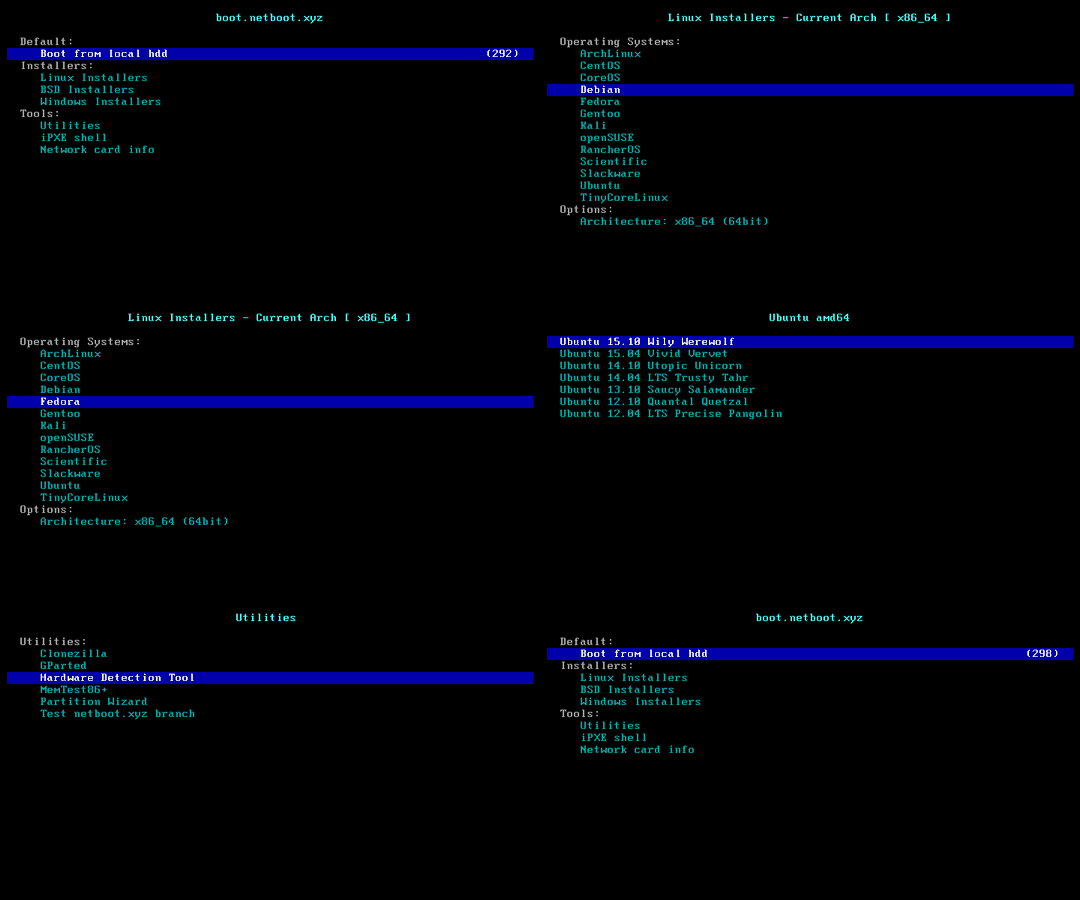
### Feature 4: Reboot to <img width="16" height="16" src="https://netboot.xyz/img/favicon.ico" /> netboot.xyz
|
||
|
||
- Can manually install [more systems](https://github.com/netbootxyz/netboot.xyz?tab=readme-ov-file#what-operating-systems-are-currently-available-on-netbootxyz) using vendor backend VNC.
|
||
|
||
> [!TIP]
|
||
>
|
||
> Although the script being run is `reinstall`, this feature **does not** delete any data or perform an automatic reinstallation; manual user operation is required.
|
||
|
||
> If the user does not damage the original system during manual operation, rebooting will return to the original system.
|
||
|
||
```bash
|
||
bash reinstall.sh netboot.xyz
|
||
```
|
||
|
||
|
||
|
||
### Feature 5: Install <img width="16" height="16" src="https://blogs.windows.com/wp-content/uploads/prod/2022/09/cropped-Windows11IconTransparent512-32x32.png" /> Windows ISO
|
||
|
||

|
||
|
||
> [!CAUTION]
|
||
>
|
||
> This feature will erase **the entire hard disk** of the current system (including other partitions)!
|
||
>
|
||
> Data is priceless — please think twice before proceeding!
|
||
|
||
- Username `administrator`, Default password `123@@@`
|
||
- If remote login fails, try using the username `.\administrator`.
|
||
- The machine with a static IP will automatically configure the IP. It may take a few minutes to take effect on the first boot.
|
||
- Supports all languages.
|
||
|
||
#### Supported Systems
|
||
|
||
- Windows (Vista ~ 11)
|
||
- Windows Server (2008 ~ 2025)
|
||
- Windows Server Essentials \*
|
||
- Windows Server (Semi) Annual Channel \*
|
||
- Hyper-V Server \*
|
||
- Azure Local (Azure Stack HCI) \*
|
||
|
||
#### Method 1: Let the Script Automatically Search for ISO
|
||
|
||
- The script will search for ISOs from <https://massgrave.dev/genuine-installation-media>, a site that collects official ISOs.
|
||
- Systems marked with \* do not support automatic ISO searching.
|
||
|
||
```bash
|
||
bash reinstall.sh windows \
|
||
--image-name "Windows 11 Enterprise LTSC 2024" \
|
||
--lang zh-cn
|
||
```
|
||
|
||
<details>
|
||
<summary>Supported languages</summary>
|
||
|
||
```text
|
||
ar-sa
|
||
bg-bg
|
||
cs-cz
|
||
da-dk
|
||
de-de
|
||
el-gr
|
||
en-gb
|
||
en-us
|
||
es-es
|
||
es-mx
|
||
et-ee
|
||
fi-fi
|
||
fr-ca
|
||
fr-fr
|
||
he-il
|
||
hr-hr
|
||
hu-hu
|
||
it-it
|
||
ja-jp
|
||
ko-kr
|
||
lt-lt
|
||
lv-lv
|
||
nb-no
|
||
nl-nl
|
||
pl-pl
|
||
pt-pt
|
||
pt-br
|
||
ro-ro
|
||
ru-ru
|
||
sk-sk
|
||
sl-si
|
||
sr-latn-rs
|
||
sv-se
|
||
th-th
|
||
tr-tr
|
||
uk-ua
|
||
zh-cn
|
||
zh-hk
|
||
zh-tw
|
||
```
|
||
|
||
</details>
|
||
|
||
#### Method 2: Specify the ISO link manually
|
||
|
||
- If you don't know the `--image-name`, you can enter any value. After rebooting, connect via SSH and re-enter the correct value based on the error messages.
|
||
|
||
```bash
|
||
bash reinstall.sh windows \
|
||
--image-name "Windows 11 Enterprise LTSC 2024 Evaluation" \
|
||
--iso "https://go.microsoft.com/fwlink/?linkid=2289029"
|
||
```
|
||
|
||
or Magnet Link
|
||
|
||
```bash
|
||
bash reinstall.sh windows \
|
||
--image-name "Windows 11 Enterprise LTSC 2024" \
|
||
--iso "magnet:?xt=urn:btih:7352bd2db48c3381dffa783763dc75aa4a6f1cff"
|
||
```
|
||
|
||
<details>
|
||
|
||
<summary>The following website provides ISO links.</summary>
|
||
|
||
- General
|
||
- <https://msdl.gravesoft.dev>
|
||
- <https://massgrave.dev/genuine-installation-media>
|
||
- <https://next.itellyou.cn>
|
||
- <https://www.xitongku.com>
|
||
- <https://www.microsoft.com/software-download/windows10> (Need to open it with a non-Windows User-Agent)
|
||
- <https://www.microsoft.com/software-download/windows11>
|
||
- <https://www.microsoft.com/software-download/windows11arm64>
|
||
- Evaluation
|
||
- <https://www.microsoft.com/evalcenter/download-windows-10-enterprise>
|
||
- <https://www.microsoft.com/evalcenter/download-windows-11-enterprise>
|
||
- <https://www.microsoft.com/evalcenter/download-windows-11-iot-enterprise-ltsc-eval>
|
||
- <https://www.microsoft.com/evalcenter/download-windows-server-2012-r2>
|
||
- <https://www.microsoft.com/evalcenter/download-windows-server-2016>
|
||
- <https://www.microsoft.com/evalcenter/download-windows-server-2019>
|
||
- <https://www.microsoft.com/evalcenter/download-windows-server-2022>
|
||
- <https://www.microsoft.com/evalcenter/download-windows-server-2025>
|
||
- Insider Preview
|
||
- <https://www.microsoft.com/en-us/software-download/windowsinsiderpreviewiso>
|
||
- <https://www.microsoft.com/en-us/software-download/windowsinsiderpreviewserver>
|
||
|
||
</details>
|
||
|
||
#### Optional Parameters
|
||
|
||
- `--password PASSWORD` Set Password
|
||
- `--allow-ping` Configure Windows Firewall to Allow Ping Responses
|
||
- `--rdp-port PORT` Change RDP port
|
||
- `--ssh-port PORT` Change SSH port (for log observation during installation only)
|
||
- `--web-port PORT` Change Web port (for log observation during installation only)
|
||
- `--add-driver INF_OR_DIR` Add additional driver, specifying .inf path, or the folder contains .inf file.
|
||
- The driver must be downloaded to current system first.
|
||
- This parameter can be set multiple times to add different driver.
|
||
- `--frpc-toml /path/to/frpc.toml` Add frpc for intranet tunneling
|
||
- `--hold 2` Allow SSH connections for modifying the disk content before rebooting into the official Windows installation program, with the disk mounted at `/os`.
|
||
|
||
#### The following drivers will automatic download and install as needed, without the need for manual addition
|
||
|
||
- VirtIO ([Community][virtio-virtio], [Alibaba Cloud][virtio-aliyun], [Tencent Cloud][virtio-qcloud], [GCP][virtio-gcp])
|
||
- XEN ([~~Community~~][xen-xen] (unsigned), [Citrix][xen-citrix], [AWS][xen-aws])
|
||
- AWS ([ENA Network Adapter][aws-ena], [NVME Storage Controller][aws-nvme])
|
||
- GCP ([gVNIC Network Adapter][gcp-gvnic], [GGA Display Adapter][gcp-gga])
|
||
- Azure ([MANA Network Adapter][azure-mana])
|
||
- Intel ([VMD Storage Controller][intel-vmd], Network Adapter: [7][intel-nic-7], [8][intel-nic-8], [8.1][intel-nic-8.1], [10][intel-nic-10], [11][intel-nic-11], [2008 R2][intel-nic-2008-r2], [2012][intel-nic-2012], [2012 R2][intel-nic-2012-r2], [2016][intel-nic-2016], [2019][intel-nic-2019], [2022][intel-nic-2022], [2025][intel-nic-2025])
|
||
|
||
[virtio-virtio]: https://fedorapeople.org/groups/virt/virtio-win/direct-downloads/
|
||
[virtio-aliyun]: https://www.alibabacloud.com/help/ecs/user-guide/install-the-virtio-driver-1
|
||
[virtio-qcloud]: https://cloud.tencent.com/document/product/213/17815#b84b2032-752c-43c4-a509-73530b8f82ff
|
||
[virtio-gcp]: https://console.cloud.google.com/storage/browser/gce-windows-drivers-public
|
||
[xen-xen]: https://xenproject.org/resources/downloads/
|
||
[xen-aws]: https://docs.aws.amazon.com/AWSEC2/latest/UserGuide/xen-drivers-overview.html
|
||
[xen-citrix]: https://docs.aws.amazon.com/AWSEC2/latest/UserGuide/Upgrading_PV_drivers.html#win2008-citrix-upgrade
|
||
[aws-ena]: https://docs.aws.amazon.com/AWSEC2/latest/UserGuide/ena-driver-releases-windows.html
|
||
[aws-nvme]: https://docs.aws.amazon.com/AWSEC2/latest/UserGuide/nvme-driver-version-history.html
|
||
[gcp-gvnic]: https://cloud.google.com/compute/docs/networking/using-gvnic
|
||
[gcp-gga]: https://cloud.google.com/compute/docs/instances/enable-instance-virtual-display
|
||
[azure-mana]: https://learn.microsoft.com/azure/virtual-network/accelerated-networking-mana-windows
|
||
[intel-vmd]: https://www.intel.com/content/www/us/en/download/849936/intel-rapid-storage-technology-driver-installation-software-with-intel-optane-memory-12th-to-15th-gen-platforms.html
|
||
[intel-nic-7]: https://www.intel.com/content/www/us/en/download/15590/intel-network-adapter-driver-for-windows-7-final-release.html
|
||
[intel-nic-8]: https://web.archive.org/web/20250501043104/https://www.intel.com/content/www/us/en/download/16765/intel-network-adapter-driver-for-windows-8-final-release.html
|
||
[intel-nic-8.1]: https://www.intel.com/content/www/us/en/download/17479/intel-network-adapter-driver-for-windows-8-1.html
|
||
[intel-nic-10]: https://www.intel.com/content/www/us/en/download/18293/intel-network-adapter-driver-for-windows-10.html
|
||
[intel-nic-11]: https://www.intel.com/content/www/us/en/download/727998/intel-network-adapter-driver-for-microsoft-windows-11.html
|
||
[intel-nic-2008-r2]: https://web.archive.org/web/20250501002542/https://www.intel.com/content/www/us/en/download/15591/intel-network-adapter-driver-for-windows-server-2008-r2-final-release.html
|
||
[intel-nic-2012]: https://www.intel.com/content/www/us/en/download/16789/intel-network-adapter-driver-for-windows-server-2012.html
|
||
[intel-nic-2012-r2]: https://www.intel.com/content/www/us/en/download/17480/intel-network-adapter-driver-for-windows-server-2012-r2.html
|
||
[intel-nic-2016]: https://www.intel.com/content/www/us/en/download/18737/intel-network-adapter-driver-for-windows-server-2016.html
|
||
[intel-nic-2019]: https://www.intel.com/content/www/us/en/download/19372/intel-network-adapter-driver-for-windows-server-2019.html
|
||
[intel-nic-2022]: https://www.intel.com/content/www/us/en/download/706171/intel-network-adapter-driver-for-windows-server-2022.html
|
||
[intel-nic-2025]: https://www.intel.com/content/www/us/en/download/838943/intel-network-adapter-driver-for-windows-server-2025.html
|
||
|
||
#### How to Specify the Image Name `--image-name`
|
||
|
||
An ISO usually contains multiple system editions, such as Home and Pro. Therefore, you need to use `--image-name` to specify the system edition (image name) to install, case-insensitive.
|
||
|
||
You can use tools like DISM, DISM++, or Wimlib to query the image names included in the ISO.
|
||
|
||
Commonly used image names include:
|
||
|
||
```text
|
||
Windows 7 Ultimate
|
||
Windows 11 Pro
|
||
Windows 11 Enterprise LTSC 2024
|
||
Windows Server 2025 SERVERDATACENTER
|
||
```
|
||
|
||
#### How to Use [DISM++](https://github.com/Chuyu-Team/Dism-Multi-language/releases) to Query the Image Names Included in the ISO
|
||
|
||
Open File menu > Open Image File, select the iso to be installed to get the image name (full system name), and all available image names are installable.
|
||
|
||

|
||
|
||
> [!WARNING]
|
||
> Vista (Server 2008) and 32-bit systems may lack drivers.
|
||
|
||
> [!WARNING]
|
||
> For EFI machines without CSM enabled, Windows 7 (Server 2008 R2) cannot be installed.
|
||
>
|
||
> Hyper-V (Azure) requires selecting the appropriate VM generation: <https://learn.microsoft.com/windows-server/virtualization/hyper-v/plan/should-i-create-a-generation-1-or-2-virtual-machine-in-hyper-v>
|
||
|
||
> [!WARNING]
|
||
> In the Chinese version of Windows 10 LTSC 2021 ISO `zh-cn_windows_10_enterprise_ltsc_2021_x64_dvd_033b7312.iso`, the `wsappx` process may indefinitely consume CPU resources.
|
||
>
|
||
> The solution is to update the system patches or manually install the `VCLibs` library <https://www.google.com/search?q=ltsc+wsappx>.
|
||
|
||
> [!WARNING]
|
||
> When installing Windows ISOs released in `May 2022` or later on GCP, the system may repeatedly reboot during the Windows installation (PE) stage. You can resolve this issue using one of the following two methods:
|
||
>
|
||
> 1. Add the `--force-boot-mode bios` parameter. The script will install Windows in `BIOS boot + MBR partition table` mode.
|
||
> <br /> - (Optional) After installation, you can convert it to `EFI boot + GPT partition table` using the command `MBR2GPT /convert /allowFullOS`.
|
||
>
|
||
> 2. Create a custom RAW image and install it via DD.
|
||
|
||
#### Considerations for Installing Windows on ARM
|
||
|
||
Most ARM machines support installing latest Windows 11.
|
||
|
||
During the installation process, you might encounter a black screen, and the serial console may display `ConvertPages: failed to find range`, but neither issue affects the installation.
|
||
|
||
| Compatibility | Cloud Provider | Instance Type | Issues |
|
||
| ------------- | -------------- | ------------- | ------------------------------------------------------------------------------------------------------------------------------------------------------ |
|
||
| ✔️ | Azure | B2pts_v2 | |
|
||
| ✔️ | Alibaba Cloud | g6r, c6r | |
|
||
| ✔️ | Alibaba Cloud | g8y, c8y, r8y | There is a chance of hanging at the boot logo during restart; forced reboot will resolve it. |
|
||
| ✔️ | AWS | T4g | |
|
||
| ✔️ | Scaleway | COPARM1 | |
|
||
| ✔️ | Gcore | | |
|
||
| ❔ | Oracle Cloud | A1.Flex | Installation success is not guaranteed; newer instances are more likely to succeed.<br />Manual loading of GPU drivers is required after installation. |
|
||
| ❌ | Google Cloud | t2a | Missing network card drivers |
|
||
|
||
<details>
|
||
|
||
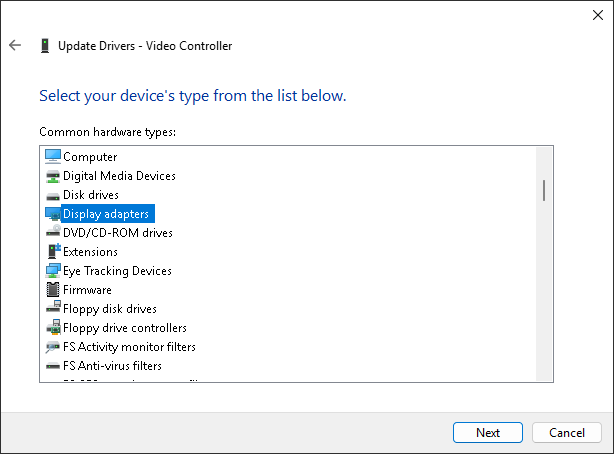
<summary>Loading Graphics Driver on Oracle Cloud</summary>
|
||
|
||
Log in to the server using Remote Desktop, open Device Manager, locate the graphics card, select "Update Driver," and choose `Red Hat VirtIO GPU DOD controller` from the list. There's no need to download the drivers in advance.
|
||
|
||

|
||
|
||

|
||
|
||
</details>
|
||
|
||
## Parameter Format
|
||
|
||
### --ssh-key
|
||
|
||
- `--ssh-key "ssh-rsa ..."`
|
||
- `--ssh-key "ssh-ed25519 ..."`
|
||
- `--ssh-key "ecdsa-sha2-nistp256/384/521 ..."`
|
||
- `--ssh-key http://path/to/public_key`
|
||
- `--ssh-key github:your_username`
|
||
- `--ssh-key gitlab:your_username`
|
||
- `--ssh-key /path/to/public_key`
|
||
- `--ssh-key C:\path\to\public_key`
|
||
|
||
## How to Use an Old Version
|
||
|
||
According to the Law of Bug Conservation, fixing old bugs often introduces new ones.
|
||
|
||
If you encounter such a situation, you can try using an older version.
|
||
|
||
Go to <https://github.com/bin456789/reinstall/commits/main> and find the old version’s `commit_id` on the right side.
|
||
|
||
```bash
|
||
commit_id=xxxxxxx
|
||
curl -O https://raw.githubusercontent.com/bin456789/reinstall/$commit_id/reinstall.sh || wget -O ${_##*/} $_
|
||
sed -i "/^confhome.*main$/s/main/$commit_id/" reinstall.sh
|
||
bash reinstall.sh ...
|
||
```
|
||
|
||
## How to Modify the Script for Your Own
|
||
|
||
1. Fork this repository.
|
||
2. Modify the `confhome` and `confhome_cn` at the beginning of `reinstall.sh` and `reinstall.bat`.
|
||
3. Make changes to the other code.
|
||
|
||
## Thanks
|
||
|
||
Thanks to the following businesses for providing free servers.
|
||
|
||
[](https://www.oracle.com/cloud/)
|
||
[](https://dartnode.com/)
|